How to Apply / Step-by-Step Guides
Applications Step-by-Step Guides
Logging in To BRIMS
Enter credentials
Use the e-mail and password set during registration
Pick a service
Choose Screening, New application, etc from your dashboard.
Forgot password?
Use the reset link on the login page.
Multiple users
Per company can be added under Profile
Browser
Chrome or Edge (latest) recommended
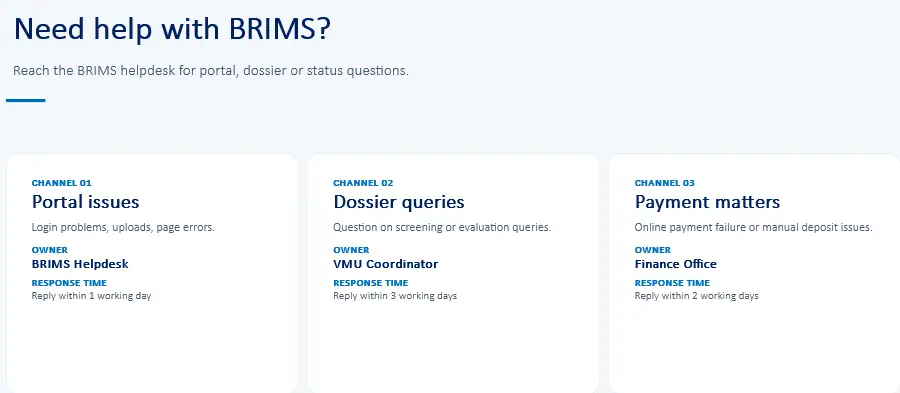
Helpdesk
BRIMS helpdesk is available during working hours.
After Successful Login
Returning users land here after their account is approved.
Screening
First-time screening of dossiers for completeness
New Application
Full registration of a new veterinary medicine
Variation
Changes to an already-registered product
Renewal
Renewing an existing registration before expiry
Exemption
Requests for exemption under DPER policy
Notes
Product information
Trade name, dosage form, strength, route of administration, target species, shelf-life and storage conditions
Ingredient details
Active substance(s), excipients, quantitative composition and specifications
Manufacturing
Manufacturer of active substance and finished product, including GMP certificates.
Packaging
Primary and secondary packaging materials, container sizes and labels
Quality & safety data
Stability studies, analytical methods, finished product specifications
Administrative
Power of attorney, free sale certificate, samples (where applicable).
Application Steps
Select Module
Screening, New or Variation
Product Info
Trade name, farm, ingredients
Manufacturer
Active and finished product
Upload Dossier
All required documents
Invoice & Pay
Online or manual payment
Submit
Confirmation on portal
Day 1
Day 1-2
Day 2-3
Day 3-5
Day 5-6
Day 7
Payments
Online Payment
Timeline: Typically 2-3 working days from receipt to VMU allocation.
Step 1
Application received
BoMRA records Mgmt Unit
Step 2
Dossier verification
RMU checks completeness
Step 3
Forwarded to VMU
Ready for processing
Manual Payment
Timeline: Typically 4-6 working days; add 1-2 days for Finance verification of the deposit.
Step 1
Application received
Routed to finance
Step 2
Fees verified
Finance confirms deposit
Step 3
RMU verification
Dossier completeness
Step 4
Forwarded to VMU
Ready for processing
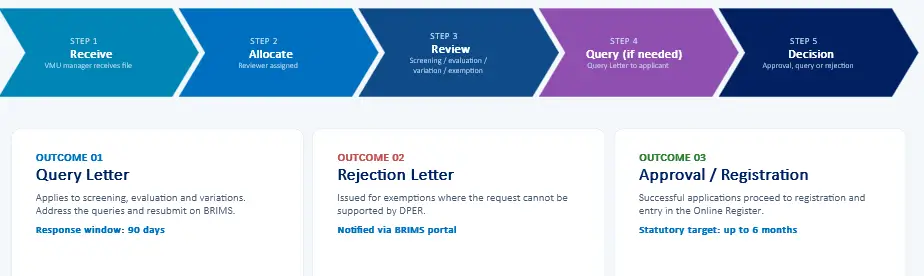
After Submission
Receive
VMU manager receive file
Allocate
Reviewer assigned
Review
Screening/ evaluation / Variation
Query (if needed)
Quay Letter to applicant
Decision
Approval, query or rejection
Manual Payment
Timeline: Typically 4-6 working days; add 1-2 days for Finance verification of the deposit.
Step 1
Application received
Routed to finance
Step 2
Fees verified
Finance confirms deposit
Step 3
RMU verification
Dossier completeness
Step 4
Forwarded to VMU
Ready for processing
BRIMS Help and Support